

Before cloning a voice in ElevenLabs, establish who authorized the recording, what the clone may say, and where the resulting audio may be used. Instant Voice Cloning requires the necessary rights and consent. Professional Voice Cloning has a stricter rule: you can create a PVC only of your own voice, even when someone else has given permission. That person must create and verify their own PVC, then share access with you.
Choose the permitted cloning route
Start with the speaker's identity and the product's eligibility rules. A recording you can download isn't automatically a recording you can use to build a voice model. Permission to edit an interview also doesn't establish permission to make that person speak new words.
| Your situation | Permitted next step |
|---|---|
| Your own voice, short sample | Consider Instant Voice Cloning, available from Starter, after checking recording rights and intended use. |
| Your own voice, dedicated model | Consider Professional Voice Cloning, available from Creator, with your own verification. |
| Another person's voice, with authorization | Check the authorized IVC route. For a PVC, the speaker creates and verifies it on their own account, then shares it. |
| No authorized recording or no need to match a person | Choose an appropriate library voice or create a synthetic voice without impersonating someone. |
The own-voice-only PVC rule applies even with consent. Don't use another person's account credentials or try to substitute your voice for their verification. If the project only needs a narrator, I'd choose a suitable library voice first because reproducing an identifiable person adds permissions and access decisions that the narration may not require.
Record permission for the actual project
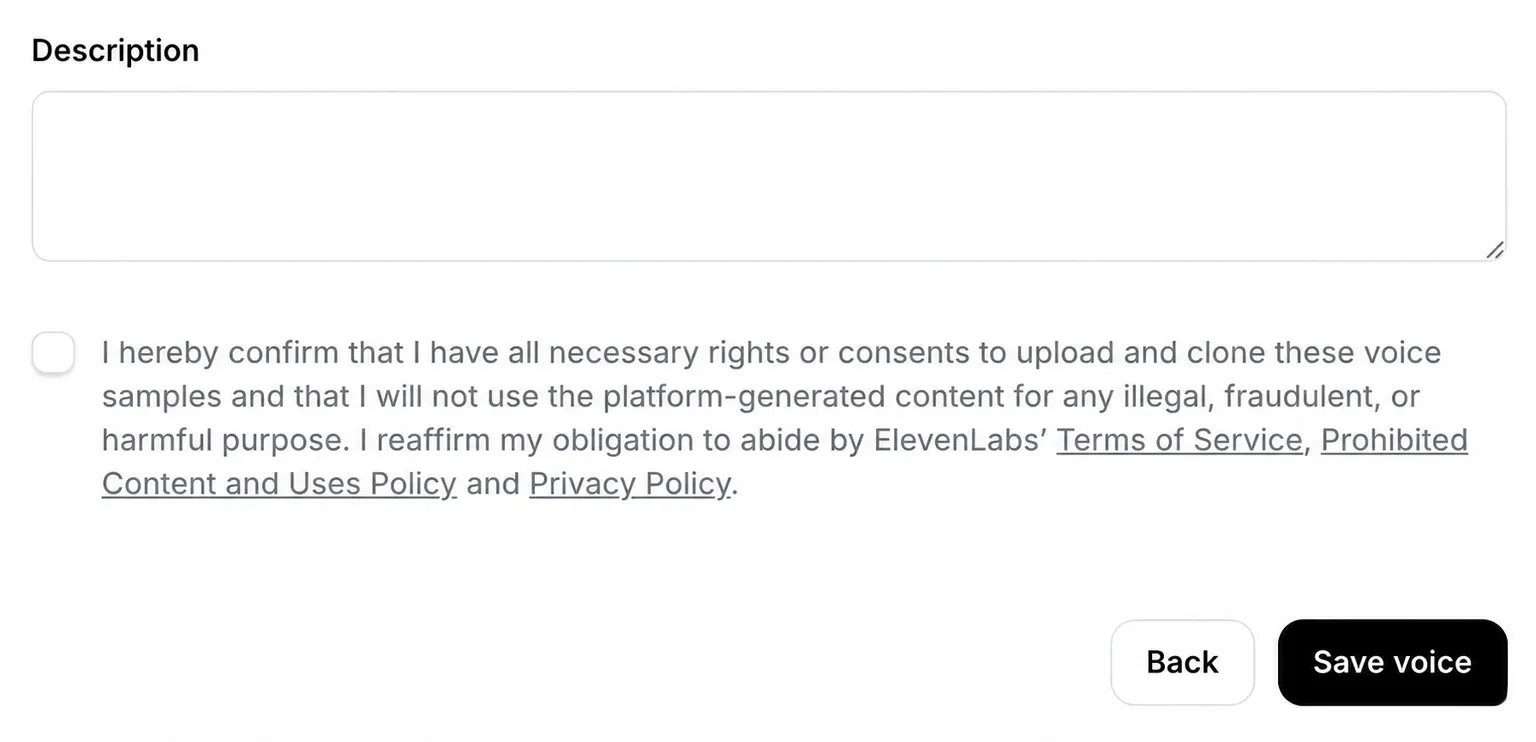
Describe the use before requesting approval. The Prohibited Use Policy requires explicit, informed consent or other valid authorization for a living person's voice and prohibits deceptive impersonation, false endorsement, and fraud. A checked upload box records a confirmation to the service; it doesn't create permission from the speaker.
I'd keep a written project record that the speaker can understand and review. Include the source recordings, who can create or use the clone, the subjects the voice may address, the permitted languages and channels, commercial or advertising uses, the approval process, and what happens when the arrangement ends. Explain that the service will process recordings and generate new speech. These are practical questions to resolve with the person giving permission, rather than a guarantee that one checklist satisfies every applicable law.
Get new approval when the proposed use moves beyond that agreement. A course narration and an advertisement can carry different implications, even if both use the same voice. Don't turn permission for one into a blanket endorsement of the other.
For covered ElevenCreative offerings such as Studio or Dubbing, the Consents and Records clause applies when identifiable-person input is submitted. It requires the necessary notices and authorizations and retention of sufficient consent records for five years from obtaining them, or longer if applicable law requires. That is a contract requirement for the covered uses; it isn't a universal US retention law or an automatic rule for every standalone cloning action.
Read the upload and training terms
Resolve the service's processing rights before uploading a sample. The non-EEA Terms of Service, which apply to US users, retain your rights as between you and ElevenLabs while granting broad licenses over content and user voice models. The stated licenses are perpetual, irrevocable, worldwide, royalty-free, and sublicensable, for providing and improving services and developing new products. Your permission must cover the rights you grant to the service.
The same terms say ElevenLabs won't commercialize your voice on a standalone basis without permission. That limitation doesn't cancel the broader content and model licenses. If the speaker agrees only to a narrowly controlled local recording session, establish whether the proposed cloud processing and contractual rights fit that agreement before proceeding.
Review Terms and Privacy → Data use if you want to opt out of training use. Under the terms, the opt-out takes effect once processed, retains an exception for use necessary to provide the service, and doesn't undo earlier uses or resulting materials. Turning off future training is different from keeping the sample entirely off the service.
Create the authorized clone
Prepare clean, consistent recordings of one speaker without music, room echo, or competing voices. The IVC guide recommends about one to two minutes of good audio. Adding more than three minutes doesn't necessarily improve the result. The file guidance recommends MP3 at 192 kbps or higher; that recommendation doesn't repair noise or a mismatched speaking style.
- Open Voices, select the plus icon, then choose Instant Voice Clone.
- Upload or record the authorized audio. Keep private information and unrelated speakers out of the sample.
- Name and label the voice, read the rights-and-consent confirmation, and confirm only when it is true.
- Choose Save voice. Then open My Voices → Use voice to generate an approved passage.
- Listen with the speaker where possible. Check identity, pronunciation, message, and delivery before using a full script.
For a PVC, the voice owner follows the Professional Voice Cloning workflow on their own account: create the PVC, upload spoken-only samples, verify their voice, and wait for fine-tuning. The documentation recommends 30–180 minutes of good audio, with longer consistent recordings preferred within that range. Check the selected model's ready status in My Voices instead of promising a completion time. If verification fails, the documented options are to wait 24 hours before another attempt or contact support.
Restrict access to the people who need it
Use My Voices → More actions → Share Voice to manage access. The private-sharing instructions distinguish three choices:
- Named workspace members: add the people or groups who need access. IVC and Voice Design voices can be shared within the workspace.
- Anyone with the link: available for PVCs shared externally. Anyone holding that link can add the voice to their account, so forwarding the link broadens access.
- Publish to Library: a separate public-sharing decision for eligible PVCs, with additional terms and possible notice periods.
For a private project, I'd use named workspace access where available. A link that can be forwarded isn't the same restriction. Agree on permitted scripts with collaborators and keep individual credentials private; access to a clone doesn't authorize every possible message.
If you later stop sharing or delete a voice, don't promise that previously downloaded audio will disappear. Public-library removal can also involve an agreed notice period. The Voice Library removal guidance explains when existing users retain access. Keep deletion, access withdrawal, and the rights in earlier output as separate decisions.
Approve the script and permitted use
Check the generation's plan and product conditions before commercial use. The publication-rights guidance says all paid plans include a commercial license when the necessary rights, applicable law, terms, and product conditions are satisfied, excluding Beta Services. Free-plan output has no commercial license. Buying a paid plan later doesn't retroactively clear audio generated on the free plan. If you share free-plan voice output noncommercially, the guidance requires elevenlabs.io or 11.ai in the title.
Keep the permission record, approved script, generated take, and relevant plan record together. Let the speaker review the actual words and context, especially translations and advertisements. Disclose AI interaction where law requires or where omitting it would materially mislead people, and don't conceal provenance signals to disguise synthetic content.
You can export permitted audio, but the voice clone itself can't be downloaded as a standalone model. Keep the authorized original samples if the agreement permits retention. Use the ElevenLabs credit guide to plan further generation, or return to the AI audio task guides when the next task needs a different workflow.