


Choose GitHub Copilot if you want inline suggestions while you edit or a coding workflow connected to GitHub issues and pull requests. Choose Claude Code if you want to delegate repository work through Claude and use the Claude subscription you already have. For multi-file agent work, compare the model and execution environment you'll use: both products can plan, edit files, and run commands.
Choose the workflow before the brand
I would start with the tool your team already permits, then identify the job it can't do well enough. An existing subscription may already include the agent you need. Buying a second assistant makes sense when it solves a specific gap, such as a missing editor integration or a model you need for difficult changes.
| Your main task | Where I'd start |
|---|---|
| Suggest code while I type | Copilot's editor completions. This is a different interaction from handing an agent a task. |
| Investigate and change several files locally | Claude Code or Copilot CLI. Choose the available model, review controls, and account allowance before comparing results. |
| Continue repository work through GitHub's web or mobile workflow | Copilot in the cloud, subject to your plan, repository access, and organization policies. |
| Use an existing Claude plan for a bounded coding task | Claude Code, after checking the plan's remaining usage and the project access you grant. |
Claude Code runs in the terminal and has editor, desktop, and web entry points. Its VS Code extension includes inline diffs and plan review. An inline diff shows a proposed change; it isn't the same thing as autocomplete appearing while you type.
Copilot CLI has its own interactive agent and plan mode. Copilot in an editor, Copilot CLI, and a cloud session have different operating environments. A result from one shouldn't be presented as a measurement of every Copilot feature.
For cloud work, GitHub distinguishes cloud sandboxes, GitHub Actions-based sessions, and remote environments. Those environments differ in session continuity and customization. Without repository write access, the session is read-only. Choose an environment that can reach the approved dependencies and checks your project needs. Cloud and GitHub Actions compute draw on an account allowance separate from AI credits, so check that allowance for hosted work.
Read the tests with the model attached
The published results support comparing configurations rather than declaring one brand better at every repository task. The two reports below use different workloads and setups, so their scores stay separate.
Small Python repository tasks: the model changed the result
In SideHub's November 3, 2026 comparison, Claude Code 2.1.317 used Opus 5.5 and Copilot CLI 1.0.105 used Haiku 4.5 by default on the author's legacy annual Pro account. The test covered a bug fix, a feature, a refactor, and a review in the Python humanize repository, with two runs per task.
| Published configuration | Result across eight task runs |
|---|---|
| Claude Code with Opus 5.5 | 8/8 passed. Both review runs found all three planted bugs. |
| Copilot CLI with Haiku 4.5 | 5/8 passed. Both reviews found one planted bug; one refactor duplicated a helper against the instructions. |
| Claude Code with Haiku 4.5 | 5/8 passed, with the same types of failed review and refactor tasks. |
The matched Haiku results are the useful qualification: the stronger result from the default Claude Code configuration doesn't establish that its interface alone caused the advantage. SideHub also checked the refactor's no-duplication requirement after the runs. Passing the automated suite hadn't caught that violation.
For the Opus configuration's bug-fix runs, the median completion time was 34.4 seconds, with a 34.0–34.8 second range. That's calculated from SideHub's two reported runs, not an average across independent laboratories. The small repository and repeat count limit the inference; use the defect checks and model comparison to guide a trial on your own task, rather than projecting the timing onto a large codebase.
SideHub ran the agents headlessly in disposable containers with broad approvals. Copilot kept its built-in GitHub MCP server, while Claude Code ran without MCP servers. Those settings affect the comparison, and the broad approvals aren't a starting configuration I'd copy onto a working repository.
Terminal tasks: the newer Fusion configuration leads this table
The Terminal-Bench 4.1 leaderboard reports 71.2% ± 2.9% resolution for GitHub Copilot with Fusion at max effort and 65.8% ± 3.1% for Claude Code with Opus 5.5 at max effort. The displayed margins are 95% confidence intervals. This comparison points in a different direction from SideHub's older default-model setup.
The linked Fusion evaluation row and Opus evaluation row each show 330 trials. The Opus row is labeled a Terminal-Bench 4.0 to 4.1 regrade. These are benchmark configurations, not forecasts of the percentage of your team's changes that will be correct.
My conclusion is to check the actual model or router before choosing. SideHub's Copilot result describes Haiku 4.5 on that account; it doesn't describe Fusion Max. Conversely, Fusion's terminal score doesn't measure editor autocomplete or prove that a particular refactor will be safe.
Check the model your account can use
Copilot CLI lets you select a model with /model. Check the choices available in your own session and any administrator restrictions. A model appearing in a benchmark or pricing table doesn't establish that your account can select it on the surface you use.
Copilot's model catalog includes models from several providers. I'd choose that route when switching providers within the approved account matters more than staying with a particular Claude workflow. Compare the available choices on your plan, rather than assuming every catalog entry is included.
Copilot Fusion is a router and orchestrator, rather than one fixed model. It can choose one model, escalate a draft to a stronger model, or have models critique a draft. The pool and execution pattern can change. Its High and Max levels can make additional model calls, affecting time and AI-credit use.
For a controlled comparison, record whether you chose a specific model or Fusion and its effort level. Keep that choice with the task result. GitHub also warns that edits already made by a discarded Fusion draft aren't automatically undone, so inspect the whole working change before committing.
A large context limit doesn't prove that the assistant read the files needed for your change. Ask it to identify the relevant entry point and callers before proposing edits. Give it the repository's build and test instructions, and correct a missing dependency or mistaken architecture assumption before implementation starts.
Set repository access before asking for changes
Keep a recoverable copy of your work and use an approved working branch or separate checkout. Remove credentials and customer data the task doesn't need. Check the active repository, branch, existing changes, and connected tools before giving either agent access.
Start with a plan. Claude Code's Plan mode explores without editing source files; Copilot CLI's plan mode analyzes the request and builds an implementation plan before writing code. Review the proposed files and checks, then approve the intended implementation. A good plan still needs its resulting code reviewed.
The permission prompt matters as much as the task description. In Claude Code's Manual mode, a one-time Bash approval differs from saving a command rule. A saved Bash approval normally persists for the repository, while a file-modification approval lasts until the session ends; the documentation identifies exceptions to the repository-root storage location, including some Windows cases.
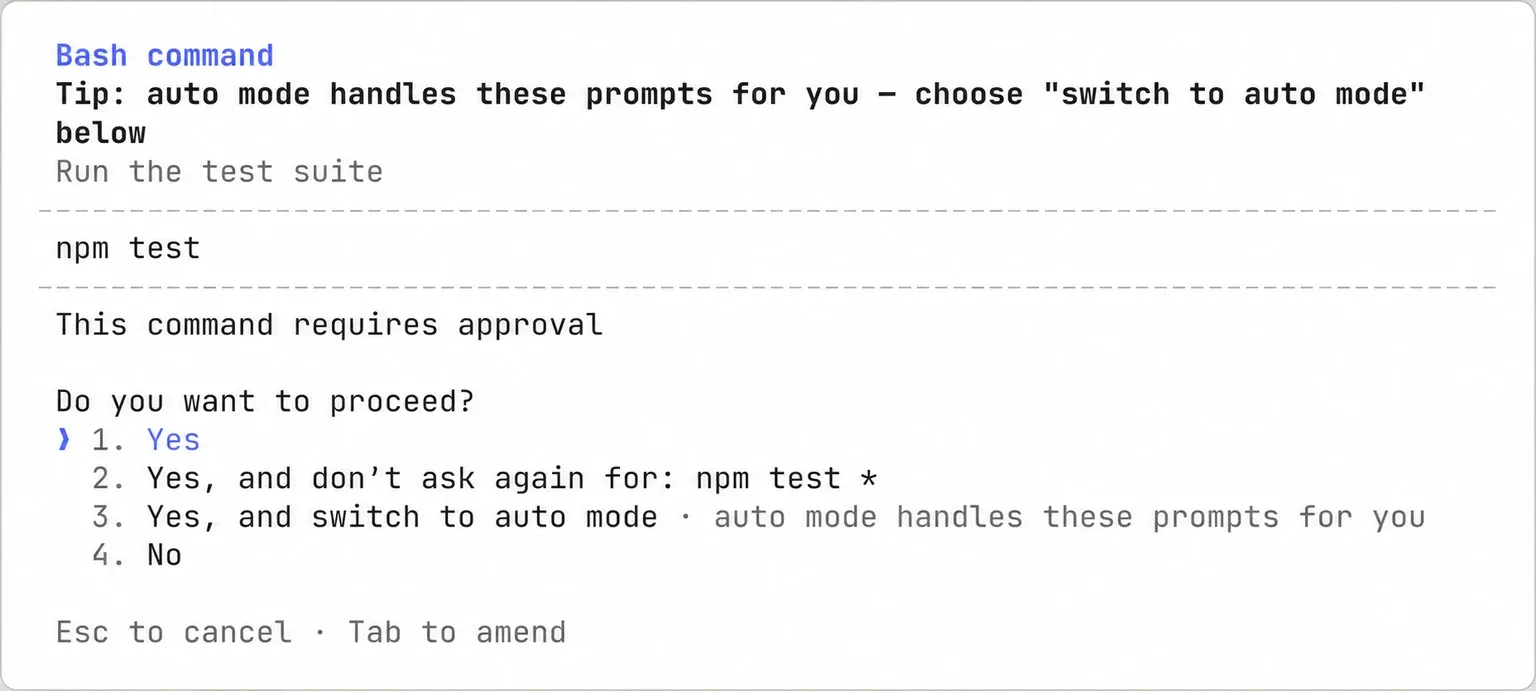
Copilot CLI's session-wide tool approval can be broader than the single command displayed. GitHub's example warns that allowing an rm command for the session can allow other rm commands. Keep approvals narrow until you understand the work. A request in a prompt to avoid a file isn't a replacement for enforced access controls.
Compare the allowance as well as the subscription
Claude Pro includes Claude Code at $20 USD when billed monthly, or $200 paid up front for a year, displayed as about $17 per month. Usage limits apply. The subscription is one payment route; an API-key session has separate token-based billing.
Claude Code's usage screen distinguishes plan usage from API session cost. The dollar figure for API token consumption isn't the subscriber's invoice for included usage. If you enable usage credits to work beyond the plan allowance, check their balance and spend limit separately.
Copilot Pro costs $10 USD per month and includes 1,000 base AI credits plus a variable flex allotment, listed as 500 credits. Chat and agent work use credits according to model tokens; completions and next-edit suggestions don't consume AI credits and remain unlimited on paid plans. These individual-plan figures don't describe an employer-managed seat.
Extra Copilot usage can add to the subscription. GitHub's model-pricing guidance describes a $0 Bundled AI credits budget with “Stop usage when budget limit is reached” enabled to prevent charges beyond the plan. Check the account's actual billing arrangement before interpreting older comparisons that count premium requests instead of token credits.
I wouldn't upgrade based on a benchmark's per-run cost alone. A cheaper attempt may leave a defect or require more review, and API-priced benchmark costs aren't the same as the charge for included subscription usage. For the allowance and reset details, see how Copilot Pro's price and credits fit together.
Choose from one bounded repository task
Use a task you understand well enough to judge, such as a small bug with a known expected behavior. Give the assistant the relevant files and project constraints, then ask it to plan before editing. A clear coding brief makes the expected result inspectable.
- Write the expected behavior and the code that must stay unchanged. Identify the checks that would reveal the original problem.
- Confirm the permitted account, model, environment, and spending limit. Keep unrelated local changes out of the comparison.
- Read the plan and the proposed command permissions. Approve the bounded task, then inspect every changed file.
- Verify the reported checks against their actual output and the resulting behavior. Record missing requirements and review effort alongside usage.
If you compare both tools, start each from the same clean revision and give them the same requirement. Don't let the second inherit the first tool's solution. A model change or a different test environment makes it a different configuration, so keep those details with the result.
Keep Copilot if its editor or GitHub workflow gives you the help you need with acceptable review effort. Choose Claude Code when its available Claude model and delegated workflow fit the task better within your allowance. Before adding a second subscription, identify the particular failed task or missing workflow it would solve.