

Select the documents you want to compare in NotebookLM's Sources panel, then ask for a separate record of each disagreement with supporting passages from both sides. Open those citations and check the original documents before deciding which statement applies. Keep unresolved differences visible in the comparison.
I'd start with one precise question, such as whether two policy drafts give the same submission deadline. A request to “compare everything” makes it harder to judge whether the answer covers the decision you need to make. Google's current help center calls the product Gemini Notebook; the source-comparison workflow below uses its desktop web interface.
Choose between comparing claims and finding every edit
A comparison of claims helps you examine opposing explanations, definitions, or instructions. A complete revision audit has a stricter requirement: every relevant insertion, deletion, and formatting change must be accounted for. A fluent answer with citations doesn't establish that completeness.
If you need an exact comparison of two Word versions, use Word's documented legal blackline comparison. Microsoft describes a desktop Windows feature that displays changes at the word or character level. Keep its default output in a new document; choosing the original or revised document as the output changes that file. Preserve the originals, including their tracked changes, before comparing them.
Use NotebookLM to investigate the meaning of a difference and assemble the evidence for a decision. For a request such as “find every changed clause,” retain the dedicated comparison result and inspect the affected clauses directly.
Identify the documents and select the comparison set
Use documents you're permitted to upload; check your organization's rules before adding internal material. Put the comparison documents together in one notebook. Before asking a question, make a short inventory in your working notes: the exact source title, issuing author or organization, version or date, and the original file location. Record the period and audience each document covers when those conditions affect your question.
Check the imported passage against the original. Google's source-import guidance says Google Drive imports update automatically every few minutes and when you open the notebook. A title containing “old version” doesn't freeze a Drive document. For a fixed comparison, retain dated copies of the versions you intend to examine and record exactly which copies you added.
Import format also matters. Google files don't bring in footnotes or comments, and an HTML webpage import excludes images, embedded videos, and nested pages. A qualification missing from the imported text can make two sources appear to disagree. Inspect the original qualification before classifying the difference.
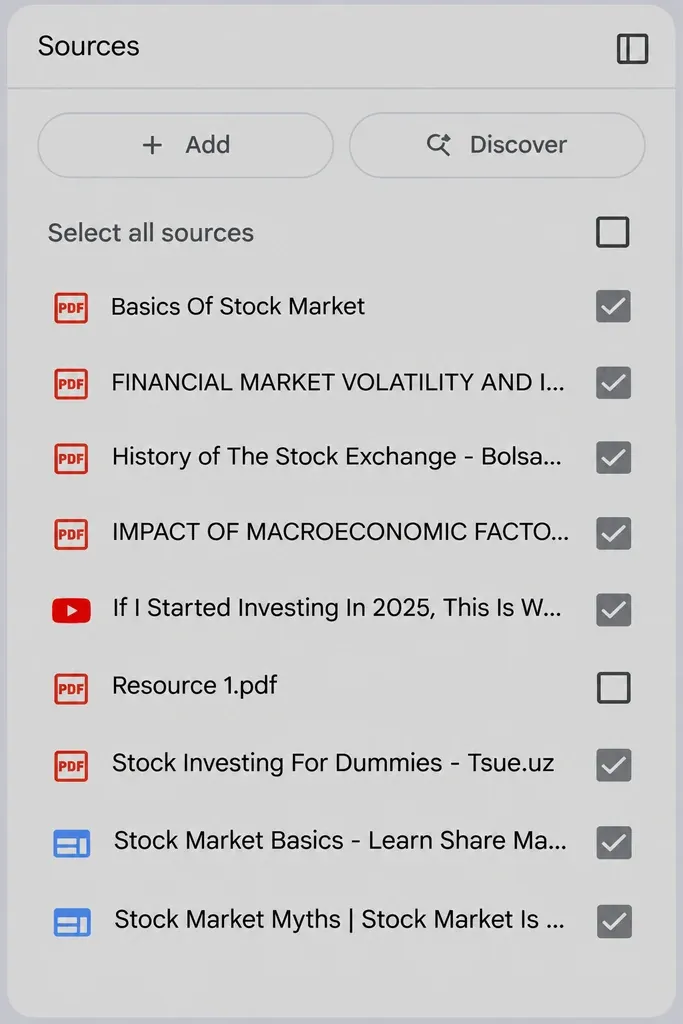
Select the relevant sources individually and deselect unrelated ones. The same Google guidance recommends naming sources in your question when several are selected. Use the exact titles from your inventory so you don't mistake a similar filename for the intended version.
The FAQ on prompt context says conversation history also contributes to responses. If an earlier answer asserted a conclusion, identify that conclusion as a claim under review. Selecting sources doesn't erase the preceding conversation or turn an earlier answer into evidence.
Ask for a source-attributed disagreement matrix
Give each disputed proposition its own row. Keep the statements from the documents separate, then add a classification and an unresolved question. Asking for an explanation of the relationship is more useful than asking the model to choose a winner immediately.
Adapt this prompt after selecting your documents. The requested matrix is a working record; you still need to verify its quotations and classifications.
Compare these selected sources on this question:
[One precise question or decision.]

Source A: [Exact title and version.]
Source B: [Exact title and version.]

Use the selected documents as evidence for the comparison.
Do not search the web or add outside evidence for this task.
Treat earlier chat conclusions as claims to check, not evidence.

Create one row per relevant difference. Include:
- The specific claim or issue.
- Source A's exact statement, a short quote, its citation,
  and a page or heading locator when available.
- Source B's exact statement, a short quote, its citation,
  and a page or heading locator when available.
- Relevant dates, definitions, populations, or conditions.
- Classification: direct contradiction, different scope or period,
  wording difference, or a statement not found in one source.
- What remains unresolved and the evidence needed to resolve it.

Keep each source's position separate. Don't reconcile a conflict
unless the documents establish the reason. If you can't locate
a passage, mark that side unverified. Don't invent a quotation
or conclude that silence means a rule was removed.
For a large source set, begin with the documents that make the opposing claims. Add a relevant authority or revision only when it helps answer the question. Keep the selection and question with the resulting record so another reader can reconstruct the comparison.
A missing row needs its own check. Google explains that responses retrieve information relevant to the question. Search the original documents for the disputed topic before treating an omission from the answer as evidence that the documents agree.
Verify both sides and classify the difference
Open each side's citation. Google's chat instructions describe hovering to see quoted text and selecting a citation to open the passage in context. Then locate the wording in the original version, with its heading or page reference. Read the qualification around the quotation before accepting the row.
A citation supporting Source A doesn't also verify Source B. If a source is very short, Google's citation FAQ says the reference may point to the whole document without an individual passage. Find and record the relevant wording yourself.
Consider these constructed excerpts from two imaginary policy drafts. Each calls for a different conclusion.
| Issue | Source record and decision |
|---|---|
| Submission deadline | Draft A: “Submit domestic claims by June 1.” Draft B: “Submit domestic claims by June 15.” These statements conflict for the same claims. Keep both dates visible until the effective version is established. |
| Reimbursement period | Draft A: “Domestic claims are processed monthly.” Draft B: “International claims are processed quarterly.” The statements concern different claim types. Preserve that scope instead of reporting a contradiction. |
| Required training | Draft A: “New reviewers must complete training.” No corresponding passage has been located in Draft B. Record the second side as unverified; that search result doesn't establish that training was abolished. |
Different wording can preserve the same requirement. Compare the person responsible and the required action before describing a rewrite as a policy change.
For research findings, compare the population and method before calling two results contradictory. A short volunteer survey and a controlled study may answer different questions. For numbers, check the unit and denominator in the original table, including the reporting period.
If the cited text doesn't match the original, resolve the source identity first. The source refresh and saved-output checks distinguish a changing Drive import from an older generated output. Repeating the comparison against an unidentified version leaves the same uncertainty in a cleaner-looking table.
Resolve authority before choosing a conclusion
Use an explicit basis for accepting one statement: an applicable final policy, an authorized correction, or stronger evidence for the same question. A newer date can help establish a revision, but it doesn't automatically make a draft more authoritative than an approved document. Repeated wording also needs a provenance check; several documents may repeat one original claim.
Patrick Hearn's published comparison using fictional sources shows the distinction. In a mountain-height exercise, NotebookLM identified the conflicting values without declaring the majority value official. In a separate budget-memo exercise, it committed to an answer despite a conflicting memo. These qualitative examples don't establish an accuracy rate; they show why a detected conflict and a defensible final decision need separate checks.
I'd retain “unresolved” when the source set doesn't establish which instruction applies. State the competing positions with their verified passages, then ask the document owner for the missing approval or effective-version evidence. A model's plausible explanation for the difference is a hypothesis until a source supports it.
Save the verified matrix with its source context
Keep your corrected rows alongside the source inventory. Add the verified locator for each quotation and record the reason for every resolution. Include the comparison question and source selection, especially if you expect to revisit a changing document set.
Within the notebook, Save to note preserves tables and clickable inline citations. Check the saved note and any document you send separately; its readers need enough original-source information to locate both sides. Google also says updating or deleting a source doesn't change studio outputs already generated from it.
Once the conflict is resolved, use the PDF summary workflow to write a concise account that retains the relevant conditions. Keep the unresolved rows with the evidence record. The research guides provide the next source-checking task when a new question emerges.