


Ask for the part of the PDF you need, request source locations for important claims, and check those locations in the original file. Keep the PDF open beside the answer. The source may attach conditions to a finding that a shorter version leaves out.
Give the summary a purpose
“Summarize this PDF” asks the model to decide what's important. Tell it the decision or question behind the summary instead: “What would change our delivery schedule?” or “What does this report say about water use?”
Upload only material you have permission to share. Check that the file is readable and that the tool can access the sections you need. A scanned page, a complex table, and selectable text need different handling; verify what the imported source contains.
Google's source guidance for its notebook tool distinguishes a general source summary from focused questions about named sources. That distinction is useful regardless of which document assistant you choose.
Ask for a bounded answer
Use this example after adding your document. Replace the topic with your own question.
Use only the PDF I supplied.
Summarize what it says about delivery delays.
Separate findings, assumptions, and recommendations.
For each important claim, give a page or section location
and a short supporting quotation where available.
Say when the document does not answer the question.
Don't fill gaps with outside information.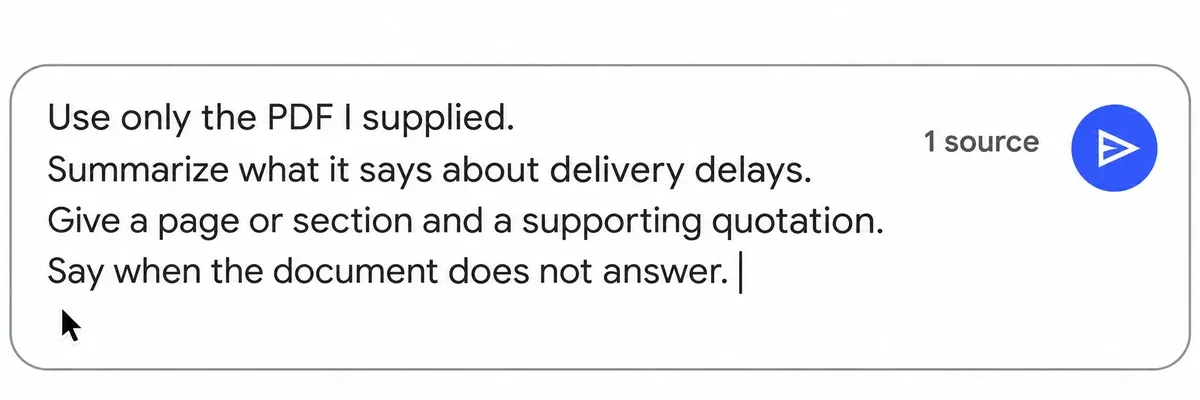
A request for a page number doesn't make that page number correct. Some viewers use file-page numbers while the document prints a different number on the page. Check the heading or quotation as well as the number.
Follow the important claims back to the file
Open the source for a claim you intend to use. Read the surrounding paragraph, including qualifications such as “estimated,” “under these conditions,” or “for this sample.” In Google's notebook chat, citations provide a route back into source material; you still need to judge whether the passage supports the answer.
Check numbers against the table or sentence that contains them. If the summary joins findings from separate sections, make sure the document makes that connection. For a consequential decision, verify every claim you plan to rely on.
Repair the unsupported part
If a sentence has no support, ask the assistant to remove it or identify the exact passage. When a table has been read incorrectly, supply the relevant rows as text and ask a narrower question. An absent answer is useful information; a plausible replacement is a new claim.
Keep the summary with the source version you checked. If the document changes, revisit the affected conclusions. When the next step is an email, carry the checked facts into a separate writing brief.