

I'd start with ChatGPT for an image that must follow a detailed brief, carry exact wording, or go through written revisions. Choose Midjourney when you want to explore a visual direction through style references and variations. Both tools now support image editing. Choose by the required result and the controls you prefer.
Choose by the brief's fixed requirements
A poster with the wrong opening time fails even if its lighting looks excellent. A concept image for a fantasy setting may leave room for interpretation. Decide which details are fixed before judging either tool's output.
| Your priority | Start with | Check before keeping it |
|---|---|---|
| Exact wording and a specified layout | ChatGPT | Every letter, required object, and position. |
| Explore an art direction using an approved style image | Midjourney | The reference's visual qualities and the brief's fixed details. |
| Revise an image through ordinary written requests | ChatGPT, or Midjourney's Edit model if you prefer its workflow | The requested change and the parts meant to stay unchanged. |
| Use image generation alongside writing and document work | ChatGPT | The final image itself; the surrounding conversation doesn't verify it. |
Use these recommendations to choose a first attempt, then judge the finished image against the brief. For a text-heavy graphic, I'd choose the shorter route to a literal brief, then proofread the downloaded image. For a visual concept with an approved look, I'd use Midjourney's reference controls and compare several candidates before committing.
Read published comparisons by version and method
The version names matter. OpenAI's Images instructions identify ChatGPT Images 2.6. Midjourney's version guide lists V8.2 as its default. A comparison of GPT-4o and experimental Midjourney V7 describes an earlier pair of models.
In Alex Hughes's April 2025 seven-prompt comparison for Tom's Guide, the published category verdicts give ChatGPT six wins and Midjourney one. Hughes used GPT-4o and experimental V7, tried Midjourney personalization on and off, and selected and upscaled its best image from four options. The categories ranged from complex scenes and text to hands and food.
The poster and hands examples show why a brief needs separate checks. ChatGPT preserved the requested poster wording in that comparison, while Midjourney's text broke down. Midjourney won the hands category for its detail. Those judgments help identify checks for a brief; the six-to-one tally doesn't establish a success rate for the current models or equal numbers of attempts.
A Geeky Curiosity comparison of Images 2.0 and Midjourney V8.1 compares instruction accuracy and visual preference under different conditions. In its public five-object still-life example, both outputs included the objects, but ChatGPT followed the requested order more closely. The author preferred Midjourney's drama and noted altered proportions. Its Midjourney prompts included personalization settings, so aesthetic preference and instruction accuracy remain separate judgments.
I wouldn't combine those examples into an accuracy percentage. They use different model versions and selection methods, with small sets of chosen prompts. Use them to decide which defects matter in your own image: incorrect wording, missing objects, changed proportions, or a look that misses the intended mood.
Check the cost and visibility before uploading
Start with the access you already have. The prices below are US-dollar monthly list prices; check the checkout currency, billing period, and applicable taxes before paying. ChatGPT Images is available on all tiers. ChatGPT Plus costs $20 per month and includes image generation alongside other tools, with usage limits that can vary. A Plus subscription doesn't include separately billed API usage. Don't buy it on the assumption that every image request is unlimited.
Midjourney's monthly plans start with Basic at $10 and 200 minutes of Fast GPU time. Standard is $30 per month and includes unlimited image generation in Relax mode. Fast GPU time is a processing-time allowance, so the Basic plan does not promise a fixed number of finished images. Annual billing has a different upfront cost.
For confidential material, check visibility before attaching a file. Midjourney's V8 Editor creations, including edits of external images, appear on its site for other members unless Stealth mode is enabled. Stealth mode requires Pro or Mega, whose monthly prices are $60 and $120. Even with Stealth enabled, work posted in a public Discord channel remains visible there. Turning on the default for future creations doesn't automatically make earlier public work private.
In an ordinary personal ChatGPT workspace, open Settings → Data controls and review Improve the model for everyone. OpenAI's data controls guidance explains that turning it off stops eligible conversations from being used for model improvement while keeping chat history. Submitting feedback can still make the associated conversation available for training. Business, Enterprise, and Edu workspaces have different defaults and organization policies.
Commercial terms also affect the choice. Midjourney's commercial-use guidance doesn't impose a blanket ban on Basic-plan business use; a business grossing more than $1 million a year needs Pro or Mega. Rights to uploaded material and the final use still need checking.
Compare the editing and reference controls
ChatGPT offers a direct conversation route. Ask for a new image, or upload an image you have permission to use and describe the change. You can open the image and select an area, or describe the edit without a selection. OpenAI warns that edits can extend beyond the highlighted area, so inspect the whole result after each revision.
Midjourney's Edit model for V8.1 and V8.2 also accepts written instructions. On the web, open the image panel from the Imagine bar and put the image in Attach to prompt. You can attach up to four images. The Edit model can change an existing image or combine references; its aspect ratio initially follows the first image, unless you specify another with --ar.
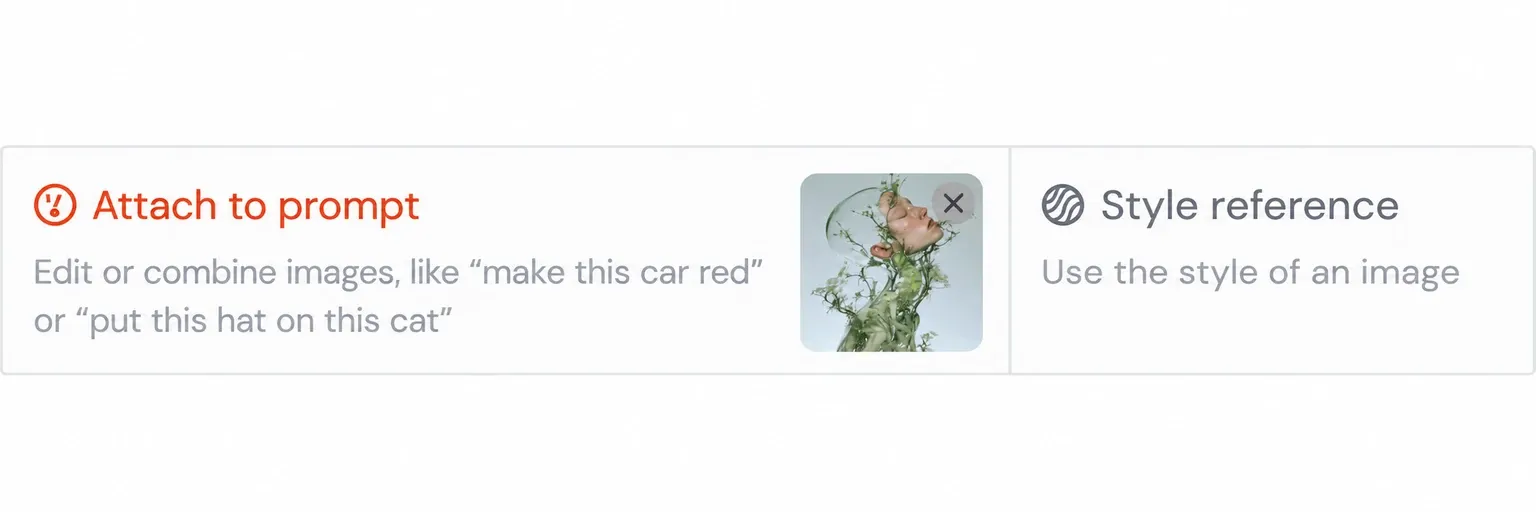
The reference roles serve different purposes. A Midjourney Style Reference guides qualities such as color, medium, texture, and lighting; it doesn't copy the reference's objects or people. Drag an approved style image into that section and describe the new subject in the prompt. Use the lock icon if you want to keep the reference attached for later prompts.
For a change confined to part of an image, Midjourney's web Editor provides selection and erase tools, plus canvas adjustments. A Smart Select mask needs to be applied with an erase action before you submit the edit. A highlighted selection alone isn't the completed edit instruction.
Choose the workflow you can inspect reliably. A written request is convenient for replacing an object or changing a setting. A selected region can make a local change clearer. Neither route removes the need to compare faces, lettering, and other fixed details with the earlier file. Save the approved version before requesting another revision.
Use a fixed brief and inspect the finished file
Write the required content before adding stylistic detail. Keep that core brief when comparing tools, then record any tool-specific settings separately. The guide to writing a clear image prompt covers composition and framing. For this choice, separate the requirements that can be checked from the visual qualities you prefer.
Use this example brief for a small event graphic:
Create a square event graphic with one blue enamel cup on a pale oak table. Leave clear space above the cup. Add exactly this heading: "WEEKEND WALK". Add exactly this line below it: "Saturday, 9 am".

Use a restrained blue-and-cream palette and soft morning light. Keep the heading readable at phone size. Include no other words or logos.
For a reference-led version in Midjourney, attach an approved style image in Style reference. Keep the required cup and wording in the text prompt. Record the model version and reference used. If you're comparing first attempts, keep all first outputs; if you're choosing the best of several candidates, record that selection rule too. Set an attempt budget before starting so you can compare the correction work as well as the finished images.
Inspect the image at full size and in its intended layout. Check the words character by character, count the required objects, and confirm that the crop leaves the message readable. Judge the lighting and palette separately. A missing comma and a mood you dislike require different corrections.
Request a specific repair, then compare the entire revision with the saved original. If lettering remains unreliable or needs an exact font, keep the image artwork and add editable text in a design editor. For the next image, stay with the tool that met your brief with an acceptable amount of correction. Return to the Images guides when the task changes.